
Concurrent Rendering in React 19, Part 2: startTransition, useTransition and useDeferredValue
Introduction: telling React what can wait
startTransition,useTransition, anduseDeferredValueare how you tell React: "this update can wait. Keep the UI responsive first."
The rest of this article explains when and how to use each one.
In Part 1, we saw how React learned to pause. It renders in small pieces, keeps a bookmark with Fiber, and handles urgent updates first using lanes.
But there was one catch: React only does this for updates you mark as "can wait". By default, every update is still urgent.
So in this part, we'll take the same frozen search box from Part 1 and fix it, step by step.
This post goes in four steps, and each one builds on the one before:
startTransition: the basic way to mark an update as not urgent.useTransition: the same idea, plus a pending flag and React 19's async transitions.useDeferredValue: for when you don't control the state update.- Choosing between them: real use cases, and the common mistakes.
If you only remember one thing by the end, make it this: all three APIs open the same door, the transition lane. The only question is where you put the label: on the update, or on the value.
Section 1: startTransition - marking work as "can wait"
startTransition tells React that the state updates inside it are not urgent. React puts them in the transition lane, renders them in small pieces, and lets any urgent update jump ahead of them.
The React team splits updates into two kinds:
- Urgent updates: typing, clicking, pressing. Users expect them immediately, the same way a physical button moves when you press it.
- Transition updates: showing search results, switching a tab, opening a page. Users expect them to take a moment, and they won't notice if they're a little late.
Think of an airport security line with an express lane. Urgent updates use the express lane. Transitions wait in the normal line, and anyone with an express pass can step in front of them at any time.
Syntax
import { startTransition } from 'react';

startTransition(() => {
  setSomeState(newValue); // marked as a transition
});
Two things to know about it
- The callback runs right away.
startTransitiondoes not delay your function. It runs it immediately and labels the state updates that happen during it. - Only state updates are affected. Any other code inside it (a
console.log, a calculation) runs normally. What becomes interruptible is the re-render caused by those updates.
Fixing the frozen search box
The trick is to split one piece of state into two: one for the input (urgent) and one for the expensive list (can wait).
import { useState, startTransition, memo } from 'react';

function Search({ products }) {
  const [query, setQuery] = useState('');   // drives the input
  const [filter, setFilter] = useState(''); // drives the list

  function handleChange(e) {
    const value = e.target.value;
    setQuery(value);              // urgent: input shows the letter now
    startTransition(() => {
      setFilter(value);           // can wait: list catches up when it can
    });
  }

  return (
    <>
      <input value={query} onChange={handleChange} />
      <ProductList products={products} filter={filter} />
    </>
  );
}

const ProductList = memo(function ProductList({ products, filter }) {
  const visible = products.filter(p =>
    p.name.toLowerCase().includes(filter.toLowerCase())
  );
  return (
    <ul>
      {visible.map(p => <li key={p.id}>{p.name}</li>)}
    </ul>
  );
});
Example: here's what happens when you type "s":
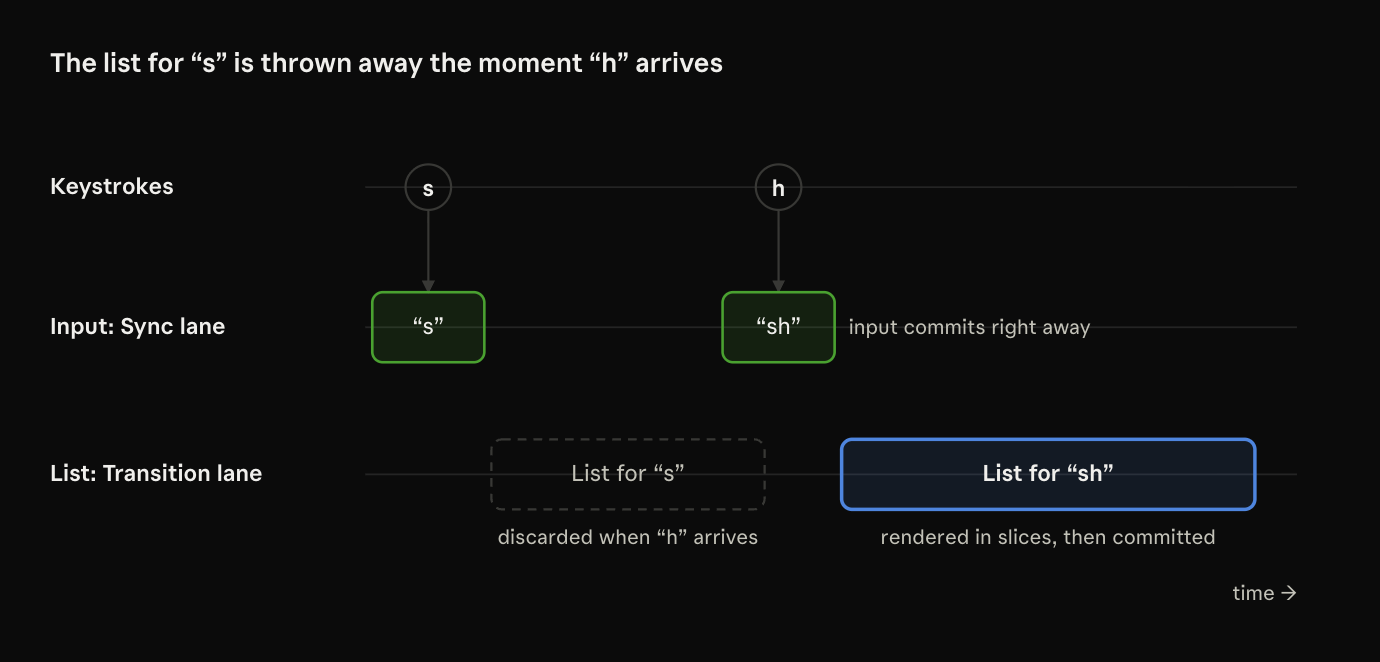
setQuery('s')goes into the urgent lane.setFilter('s')goes into the transition lane.- React handles the urgent work first.
Searchre-renders withquery = 's'andfilter = ''.ProductListdidn't get new props, somemoskips it. The "s" shows up almost instantly. - Then React starts the transition render with
filter = 's', in small pieces. - If you type "h" before it finishes, React throws away the half-built list, shows "sh" in the input, and starts again with
filter = 'sh'. The list for "s" is never shown, because nobody needs it anymore.
Don't skip the
memo. Without it, the urgent render re-rendersProductListtoo (children re-render by default, remember Part 1), and you're back to a slow keystroke. If your project uses the React Compiler, it adds this memoization for you.
Where you'll use it
- Router navigation: routers wrap navigations in transitions so the current page stays usable while the next one renders. The Next.js App Router does this for
router.push. - Data libraries and stores: a module that applies a big server response to state can wrap it in
startTransitionwithout living inside a component. - Big UI changes from non-component code: applying a saved dashboard layout, or switching a theme that re-renders hundreds of widgets.
Limitations
| Limitation | Why |
|---|---|
| Not for the input's own value | The input must update right away, or the cursor and typed letters get out of sync. Split the state like above. |
| No pending flag | It can't tell you if the transition is still running. Need a spinner? Use useTransition. |
| Doesn't make slow code fast | The list still takes 200 ms. Those 200 ms just don't block typing anymore. |
Section 2: useTransition - the same idea, with feedback
useTransition is the hook version of startTransition. It does the same job, and adds one thing users need: an isPending flag, so you can show that something is happening.
const [isPending, startTransition] = useTransition();
isPendingistruefrom the moment you start the transition until React shows its result.startTransitionworks like the standalone function, but React tracks it for this component so it can updateisPending.
How isPending works under the hood
When you call the hook's startTransition, React actually schedules two updates:
- An urgent update that sets
isPendingtotrue. - A transition update that sets your state and sets
isPendingback tofalse.
The urgent one shows first, so the loading state appears right away. The second one shows only when the whole background render is done.
That's why
isPendingnever lies: it flips back tofalsein the same commit that shows the new content.
Example: dashboard tabs that never freeze
This is the most common real use. Some tabs are cheap, and one renders a heavy table or a set of charts.
import { useState, useTransition } from 'react';

function Dashboard() {
  const [tab, setTab] = useState('overview');
  const [isPending, startTransition] = useTransition();

  function selectTab(nextTab) {
    startTransition(() => {
      setTab(nextTab);
    });
  }

  return (
    <>
      <TabBar active={tab} onSelect={selectTab} pending={isPending} />
      <section style={{ opacity: isPending ? 0.6 : 1 }}>
        {tab === 'overview' && <Overview />}
        {tab === 'orders' && <OrdersTable />}
        {tab === 'analytics' && <AnalyticsCharts />}
      </section>
    </>
  );
}
Example: you click "Analytics", and its charts are heavy.
- Without a transition: the page freezes until all the charts render.
- With a transition: the click responds right away (the content dims), the old tab stays visible and usable, and if you change your mind and click "Orders" halfway through, React drops the chart work and switches.
Transitions and Suspense
Normally, when a component suspends (it's waiting for code from lazy() or data from use()), React shows the nearest <Suspense> fallback. That's fine on first load. But if the user is already looking at a tab, swapping it for a big spinner feels sudden and annoying.
When the update that caused the suspension is a transition, React keeps showing the old UI and waits for the new one to be ready. You use isPending to show a small indicator instead.
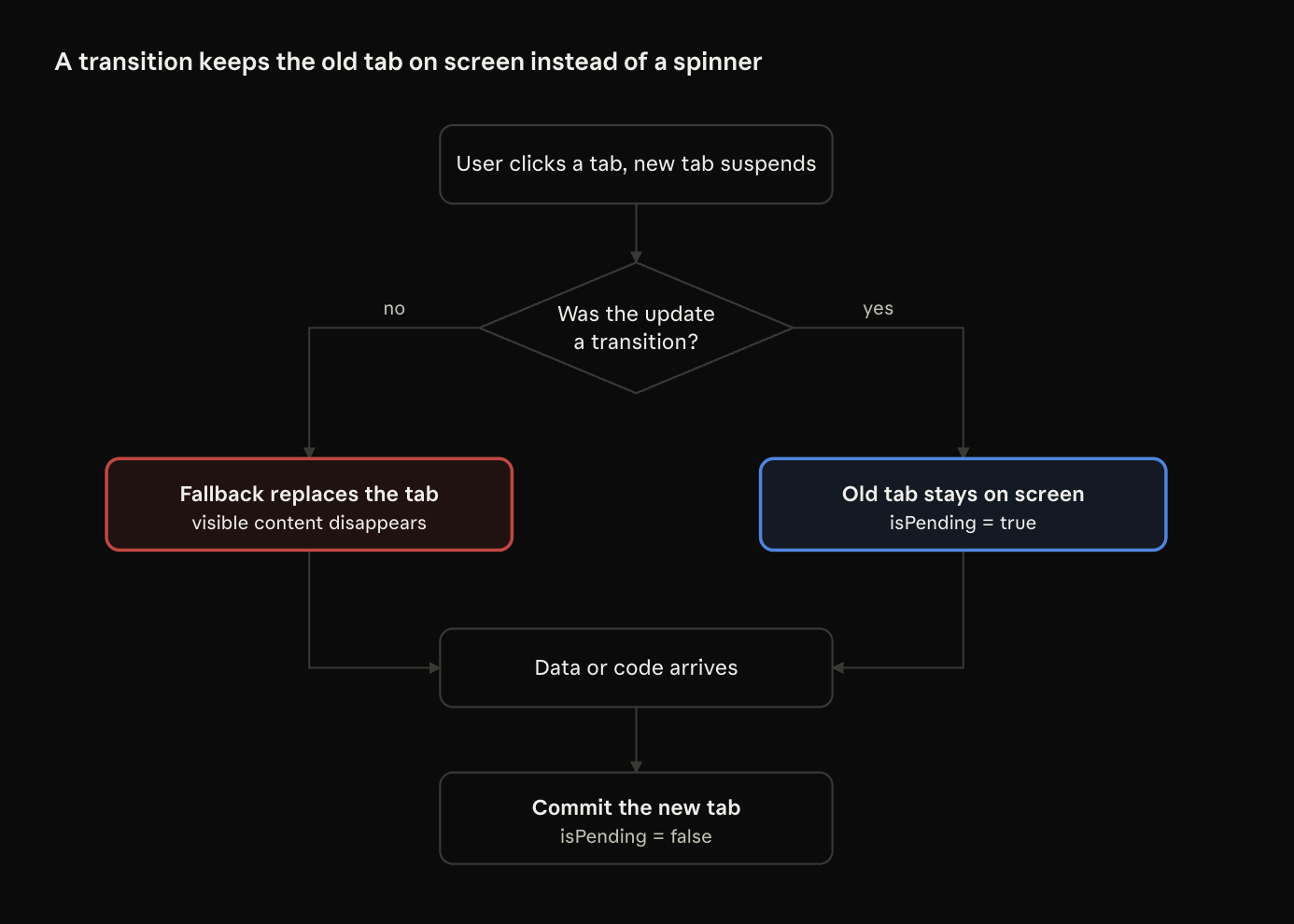
This only protects content that's already on screen. A brand-new
<Suspense>boundary showing for the first time will still show its fallback, and that's what you want.
Section 3: useDeferredValue - when you don't own the update
useDeferredValue gives you a copy of a value that's allowed to lag behind. Urgent renders see the old copy, and a background render catches it up.
You use it when you can't wrap the state update in a transition, usually because the value comes in as a prop, or from code you don't control.
The difference in one line:
useTransitionwraps the update: "thissetStatecan wait".useDeferredValuewraps the value: "the parts of the UI that read this value can wait".
Think of a live TV broadcast with delayed subtitles. The picture (your input) is live. The subtitles (the heavy list) can lag a little and catch up, without ever stopping the broadcast.
Syntax
const deferredValue = useDeferredValue(value);

// React 19: optional initial value for the very first render
const deferredValue = useDeferredValue(value, initialValue);
Fixing the search box, version two
Same problem as Section 1, but this time we keep one piece of state.
import { useState, useDeferredValue, memo } from 'react';

function Search({ products }) {
  const [query, setQuery] = useState('');
  const deferredQuery = useDeferredValue(query);
  const isStale = query !== deferredQuery;

  return (
    <>
      <input value={query} onChange={e => setQuery(e.target.value)} />
      <div style={{ opacity: isStale ? 0.6 : 1 }}>
        <ProductList products={products} filter={deferredQuery} />
      </div>
    </>
  );
}

const ProductList = memo(function ProductList({ products, filter }) {
  // same expensive filtering as before
});
No split state, no handler logic. isStale gives us the same "something is coming" signal that isPending gave us before.
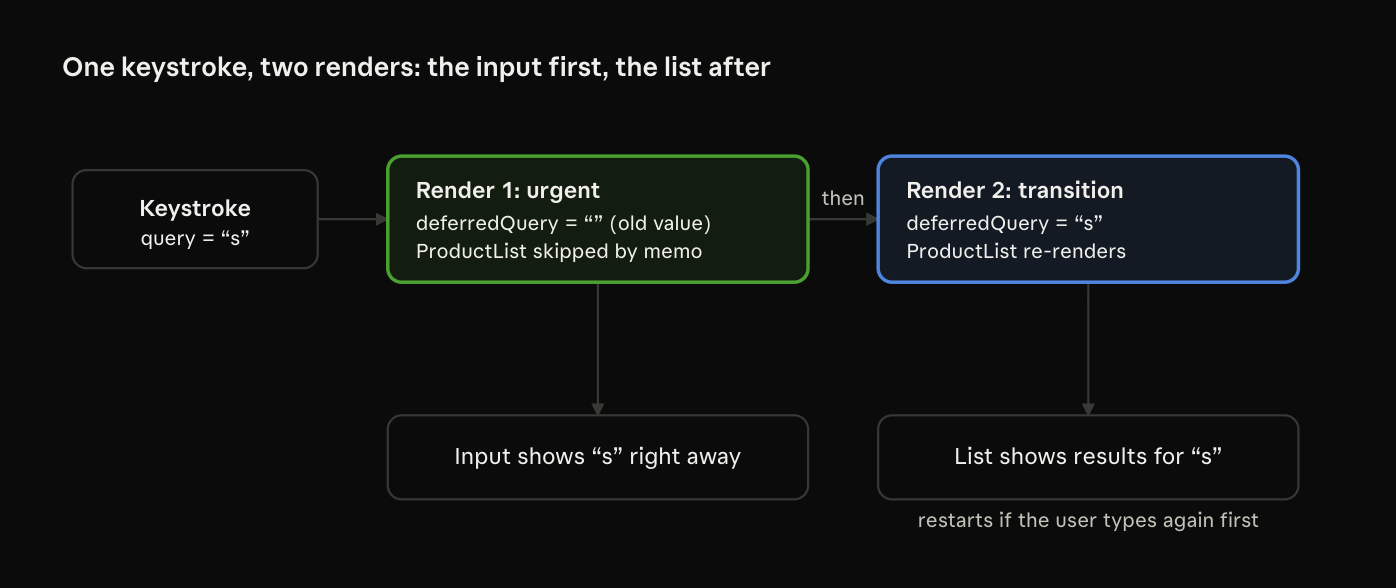
What happens on each keystroke
useDeferredValue causes two renders for every change:
- Urgent render:
queryis's', butuseDeferredValuestill returns the old value''.ProductListgets the same prop as before, somemoskips it. The input updates right away. - Background render: React schedules a second render in the transition lane, where
useDeferredValuereturns's'. NowProductListre-renders, in small pieces.
If you type again during step 2, React throws that background render away and starts over with the latest value.
Again:
memois not optional. Without it, render 1 re-rendersProductListanyway, and the hook does nothing. (The React Compiler handles this for you.)
It is not a debounce
People often call useDeferredValue "built-in debouncing". It isn't, and the difference matters:
| Debounce (300 ms) | useDeferredValue |
|
|---|---|---|
| Delay | Fixed, even on fast devices | None. Starts right away and adapts to the device |
| When the update runs | Blocks the main thread | Interruptible, gives the browser time every few ms |
| Stale work | Runs to the end | Thrown away when a newer value arrives |
| Fewer network requests | Yes | No |
That last row is the key. useDeferredValue is about rendering, not fetching. If every keystroke sends an API call, you still want a debounce (or request cancellation) for the network. The two work well together.
React 19: initialValue
By default, on the very first render, useDeferredValue returns the real value, so the first paint is just as heavy as without the hook. React 19 adds a second argument:
const deferredResults = useDeferredValue(results, []);
On mount, React first renders with [] (cheap, paints fast), then schedules a background render with the real results.
Example: a dashboard with a heavy chart.
- Without
initialValue: the whole page waits for the chart, and the user stares at a blank screen. - With
initialValue: the page appears right away, and the chart fills in a moment later.
Where you'll use it
- Search and autocomplete where the query comes in as a prop or from the URL.
- Charts that follow a slider or a date-range picker: the control moves smoothly, the chart catches up.
- Third-party inputs (a date picker, a rich text editor) that own their state, so you can't wrap their updates.
- Live previews: a Markdown editor with a preview, or a JSON editor with a tree view.
Section 4: Choosing the right tool
All three APIs open the same door, the transition lane. So the choice comes down to two questions:
- Do you control the state update?
- Do you need to show a pending state?
startTransition |
useTransition |
useDeferredValue |
|
|---|---|---|---|
| What you wrap | The state update | The state update | The value |
| Where you can use it | Anywhere, even outside components | Inside components only | Inside components only |
| Pending indicator | None | isPending |
value !== deferredValue |
| Best for | Routers, libraries, non-component code | Tabs, navigation, filters, save buttons | Props, third-party inputs, URL values |
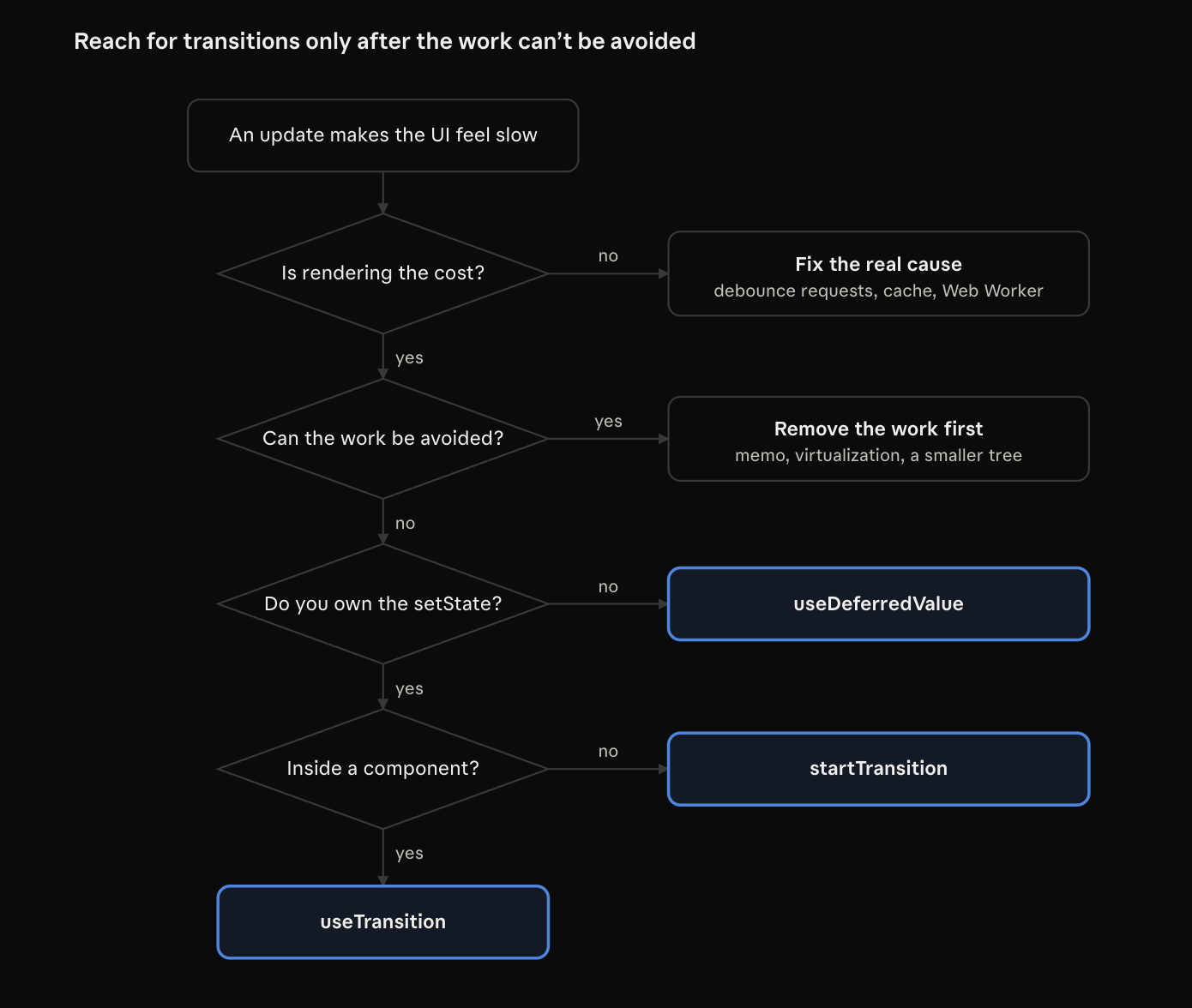
Before reaching for any of them, ask: can this work be avoided? Transitions keep the UI responsive while slow work happens. They don't remove the slow work. A 10,000-row list should usually be virtualized first. First, try to make the work smaller. If it’s still slow after that, use a transition.
Putting it together: an analytics dashboard
Here's how all two fit into one real screen: tabs, a date-range slider driving a chart.
import { useState, useTransition, useDeferredValue, memo } from 'react';

function AnalyticsPage({ initialRange }) {
  // 1. Tabs: we own the update and want feedback -> useTransition
  const [tab, setTab] = useState('revenue');
  const [isTabPending, startTabTransition] = useTransition();

  // 2. Range slider: input must be instant, chart can lag -> useDeferredValue
  const [range, setRange] = useState(initialRange);
  const deferredRange = useDeferredValue(range);
  const isChartStale = range !== deferredRange;

  return (
    <>
      <Tabs
        value={tab}
        onChange={next => startTabTransition(() => setTab(next))}
        pending={isTabPending}
      />

      <RangeSlider value={range} onChange={setRange} />

      <div style={{ opacity: isChartStale || isTabPending ? 0.6 : 1 }}>
        <MetricChart metric={tab} range={deferredRange} />
      </div>
    </>
  );
}

const MetricChart = memo(function MetricChart({ metric, range }) {
  // expensive: aggregates thousands of data points and draws an SVG chart
});
Why each choice:
- Tabs: we call
setTabourselves and want to dim the content, souseTransition. - Range slider:
setRangemust be urgent so the slider follows the mouse. The chart reads the deferred copy, souseDeferredValue. memoon the chart: without it, neither the transition nor the deferred value can skip the chart during urgent renders.
Common mistakes
Almost all of these come from forgetting one of two rules from Part 1: urgent renders still re-render children, and background renders can be thrown away.
1. Putting the input's own value in a transition
// ❌ Wrong: the input lags or drops letters
function handleChange(e) {
  startTransition(() => setQuery(e.target.value));
}

// ✅ Right: the input is urgent, the expensive part can wait
function handleChange(e) {
  setQuery(e.target.value);
  startTransition(() => setFilter(e.target.value));
}
Mark the result of typing as a transition, never the typing itself.
2. Forgetting memo on the expensive child
Without memo, the urgent render re-renders the slow component with its old props. You pay the full cost on every keystroke, and the transition just adds a second render on top.
If you add
useDeferredValueand see no improvement, check this first.
3. Setting state after await without wrapping it
// ❌ Not a transition: setReport runs as a normal, blocking update
startTransition(async () => {
  const data = await fetchReport(range);
  setReport(data);
});

// ✅ Right
startTransition(async () => {
  const data = await fetchReport(range);
  startTransition(() => setReport(data));
});
4. Using a timer inside the transition
// ❌ Wrong: when the timeout fires, the transition is already over
startTransition(() => {
  setTimeout(() => setPage(2), 100);
});

// ✅ Right: wrap the update wherever it happens
setTimeout(() => {
  startTransition(() => setPage(2));
}, 100);
The callback runs right away, so only updates made during that call get the label.
5. Side effects in the render body
function ResultsList({ results }) {
  analytics.track('results_viewed', { count: results.length }); // ❌
  return <List items={results} />;
}
With concurrent rendering, a render can run several times, or be thrown away before it reaches the screen. This code would log views the user never saw. Put it in an effect, which only runs after a real commit.
6. Passing a new object to useDeferredValue
// ❌ Wrong: a new object every render, so it never settles
const deferred = useDeferredValue({ query, sort });

// ✅ Right: defer simple values
const deferredQuery = useDeferredValue(query);
const deferredSort = useDeferredValue(sort);
React compares the values with Object.is. A new object is always "different", so React does an extra background render every time.
7. Expecting useDeferredValue to reduce API calls
It defers rendering, not fetching. If every keystroke sends a request, add a debounce, cancel old requests with AbortController, or use a data library that does it for you.
8. Expecting transitions to fix slow code
A transition makes slow work interruptible, not faster. If a render takes two seconds, users still wait two seconds for the result. Profile with React DevTools first, then reduce the work (virtualize, memoize, etc.).
Wrapping up the series
Here's the whole series in short points:
- Rendering works out what the UI should look like. React can repeat it or throw it away. Commit is the only step that changes the DOM.
- Old React couldn't stop. Once a big update started, the page froze until it was done.
- Fiber, time slicing, and lanes let React work in small pieces and handle urgent updates first.
startTransitionmarks state updates as "can wait". It works anywhere, even outside components.useTransitiondoes the same and gives youisPending.useDeferredValuedefers a value instead of an update, for when you don't control thesetState.- None of them make code faster. Measure first, reduce the work, then use transitions to keep the UI responsive.
Try it yourself: take the frozen search box, add an artificial slowdown to each row, and try it three ways: plain, with
startTransition, and withuseDeferredValue. Then turn on CPU throttling in Chrome DevTools. The difference you feel in the input is the whole point of this series. 👀
Further reading
- useTransition, startTransition, and useDeferredValue: the official docs, with interactive examples.
About the author
- A Senior frontend engineer (5+ years) building production apps with React, Next.js, Vue and TypeScript. Clear under-the-hood explanations, real-world examples, and senior interview prep.
Comments
Join the discussionNo comments yet. Be the first to comment.
Concurrent Rendering in React 19
A two-part deep dive into how React 19 schedules, pauses, and prioritizes rendering work, and how to use startTransition, useTransition, and useDeferredValue to keep your UI responsive.